


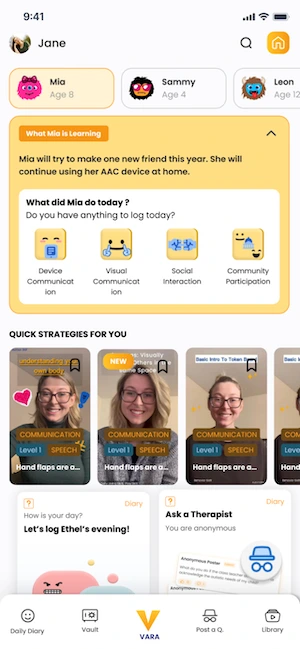
Post a Question is a helpful feature in the Autism360 app. It lets you ask questions and get advice from therapists and other families who understand what you’re going through.
This tutorial is for parents and carers opening Post a Question for the first time. It explains what to expect on your first visit, the “Good to Know” guidelines, and how to read, comment on and react to other families’ questions.
Your first visit at a glance
- Open Post a Question in the Autism360 app.
- Read the Good to Know document and accept the guidelines (you only need to do this once).
- Scroll through questions other families have asked.
- Leave a comment on questions that relate to your own experience.
- React to posts with one of the three emojis to show support.
📱Try the Autism360 App Free for 7 Days
Get started today with a 7-day free trial: 👉 Download Autism 360 App
A Friendly Space, Not a Doctor’s Office
While this forum is a great place to share and learn, it’s important to know that it doesn’t replace professional medical advice. If you have a serious concern, always talk to a doctor or healthcare provider.
Read the “Good to Know” Document
Before you post, make sure to read the “Good to Know” document. It explains how the forum works and confirms that you understand and accept the guidelines. Once you’ve read it, the introduction screen won’t show up again on your next visit. You’ll go straight to the questions!
Explore Questions from Other Families
You can scroll through questions that other users have asked. This is a great way to see what others are dealing with and learn from their experiences.
Join the Conversation
We encourage you to read the responses and leave a comment on questions that relate to your own experiences. Your voice matters, and it could help someone else!
Show Your Support
Want to show some love? You can react to posts using three different emojis. It’s a simple way to support another parent or caregiver in the community.
Tips for asking a helpful question
- Give a little context. Your child’s age, how they communicate (speech, signs, AAC) and what you’ve already tried help others give useful answers.
- Keep it to one topic. Sleep, mealtimes or school transitions are easier to answer one at a time.
- Protect your family’s privacy. Avoid full names, school names or photos that identify your child.
- Search first. Scroll through existing questions, as another family may have asked something similar.
- Be kind. Every family’s path is different. Share what worked for you without judging what others choose.
Frequently asked questions
Why don’t I see the introduction screen anymore?
Once you’ve read the Good to Know document, the introduction won’t show again. You’ll go straight to the questions on your next visit.
Can I get medical advice here?
No. The forum is a friendly space to share and learn, but it doesn’t replace professional medical advice. For serious concerns, talk to a doctor or healthcare provider.
Read on to Explore the Autism360 App Tutorial:
📚 Resources Explained
Discover all the helpful resources the Autism360 app offers to support your journey.
💬 How to Submit a Question
Learn how to post and submit your questions easily within the Autism360 app.

Rachael Young is a behavior analyst with Autism 360, specializing in tailored, evidence-based support that improves daily life for children and their families. She is an Adjunct Instructor at Arizona State University, where she trains the next generation of behavior analysts, and is completing a PsyD in Clinical Psychology to deepen her clinical practice. Rachael is proud to identify as neurodivergent, and that lived perspective shapes the empathy and practicality of her work. She writes about ABA, autism in girls and women, co-occurring conditions and the teen years.


