


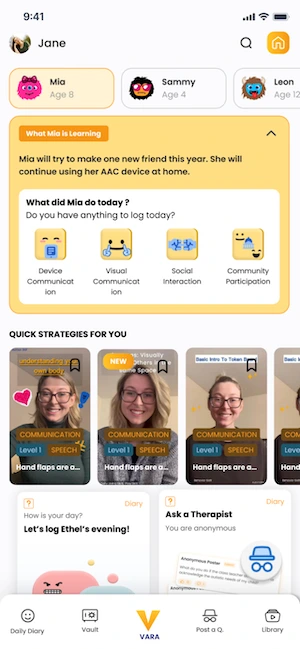
Want to better understand your child’s behavior and see how they’re growing? The Insights feature in the Autism360 app, a helpful autism app, is here to help, and it’s easy to use!
This short tutorial is for parents and carers who already log entries in the Daily Diary. It walks you through reading your child’s Insights, switching between children, filtering the color-coded graphs and getting your monthly report by email.
Quick steps
- Log entries in the Daily Diary regularly (Insights are built from your diary).
- Open Insights to see possible triggers, patterns and practical tips.
- Scroll back through past months to see progress in the graphs.
- Tracking more than one child? Tap their monster avatar to switch profiles.
- Filter the color-coded categories to focus on sleep, moods or milestones.
- Tap the email button below the graph to get the latest report any time.
Start with the Daily Diary
The more days you log in your child’s daily diary, the more useful the insights will be. The diary is your key to spotting patterns and understanding what’s really going on in your child’s world.
Discover the ‘Why’ Behind Behaviors
Ever wonder why certain behaviors happen in specific settings? Behavior is often your child’s way of telling you something, and the Insights feature helps you connect the dots. It shows you what might be triggering certain actions and offers practical tips to support your child, such as changes to the environment or routine.
Track Their Progress Over Time

Curious about how far your child has come? Just scroll back through past months to see their journey in clear, easy-to-read graphs.
Switch Between Children Easily
If you’re tracking more than one child, no problem! Just tap their cute monster avatar to switch profiles. Each child gets their own personalized insights.
Use Color-Coded Graphs for Clarity
Insights are organized into color-coded categories, so you can filter what you want to focus on, whether it’s sleep, moods or milestones.
Monthly Reports Sent to Your Inbox
At the end of each month, you’ll get a full insights report delivered to your email. Don’t want to wait? You can also tap the email button below the graph to get the latest report whenever you like.
Troubleshooting and tips
- Not seeing much in Insights yet? Insights grow with your diary. Keep logging for a few weeks and patterns become clearer.
- Seeing the wrong child’s graphs? Check which monster avatar is selected and tap to switch profiles.
- No monthly report in your inbox? Check your spam or promotions folder, or tap the email button below the graph to send it now.
- Use Insights as a starting point. They point to possible triggers. You know your child best, so treat them as clues to explore, and share the report with your coach, therapist or teacher. Insights work hand in hand with the diary and therapist support in the VARA autism parenting app.

Read More On:
📱 More Screen Explained
A walkthrough of the “More” screen, helping you navigate additional features in the Autism360 app.
🎬 How to Explore Our Autism Video Collection Easily
Learn how to browse and access our curated autism video collection easily within the Autism360 app.

Rachael Young is a behavior analyst with Autism 360, specializing in tailored, evidence-based support that improves daily life for children and their families. She is an Adjunct Instructor at Arizona State University, where she trains the next generation of behavior analysts, and is completing a PsyD in Clinical Psychology to deepen her clinical practice. Rachael is proud to identify as neurodivergent, and that lived perspective shapes the empathy and practicality of her work. She writes about ABA, autism in girls and women, co-occurring conditions and the teen years.


