This short tutorial is for parents and carers who have set up more than one child profile in the Autism360 app. It shows you how to switch between your children in the Daily Diary, so each child’s logs stay separate and easy to review.
The Daily Diary in the Autism360 app works as an autism diary app: a simple place to record what happens in your child’s day. Looking back over your logs can help you spot patterns, understand what your child may be communicating and see which kinds of support help most. If you have more than one child profile set up, it’s easy to switch between them and keep separate logs for each. This way, you can track each child’s progress individually and get personalized Insights.
How to Switch Between Child Profiles
Quick steps:
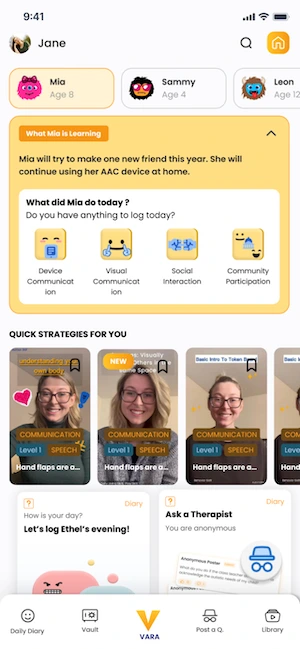
- Open the Daily Diary. It starts with the first child profile you created.
- Tap the child’s name in the top right corner of the screen.
- Choose the child you want from the list of profiles.
- Add your new log. It saves under that child’s profile only.
Here is each step in a little more detail.
Starting with the First Child Profile
When you open your daily diary, it will automatically start with the first child profile you created.
Switching to Another Child Profile
To switch profiles, just tap the name in the top right corner of the screen. A list of all your child profiles will appear. Select the name of the child you want to switch to.
Adding Logs for Each Child
Once you’ve selected a profile, you can add a new log for that child. The information you enter will be saved under their profile only and won’t affect the logs of your other children.
Why It Matters
This feature helps you stay organized and makes sure the insights you get are tailored to each child’s needs. Every child is different, so keeping their logs separate gives you a clearer picture of what works for each of them.
Tips for Useful Diary Logs
- Check the name first. Glance at the name in the top right corner before you add a log, so it lands in the right child’s diary.
- Log soon after it happens. A quick note while it’s fresh is more useful than a long one written from memory days later.
- Note what came before and after. Recording what was happening around a hard moment (noise, hunger, a change in plans) helps you spot what your child may be telling you.
- Record the good moments too. Noting what helped, and what your child enjoyed, shows you which supports are working.
Common Questions
Will one child’s logs show up in another child’s profile?
No. Each log is saved under the profile you had selected when you added it, so your children’s diaries stay separate.
Which profile opens when I start the Daily Diary?
The diary opens on the first child profile you created. Tap the name in the top right corner to switch.

Read More On:
💬 How to Submit a Question
Learn how to post and submit your questions easily within the Autism360 app.
👤 How to Edit Profile Details
Step-by-step guide on updating and managing your profile details in the Autism360 app.

Rachael Young is a behavior analyst with Autism 360, specializing in tailored, evidence-based support that improves daily life for children and their families. She is an Adjunct Instructor at Arizona State University, where she trains the next generation of behavior analysts, and is completing a PsyD in Clinical Psychology to deepen her clinical practice. Rachael is proud to identify as neurodivergent, and that lived perspective shapes the empathy and practicality of her work. She writes about ABA, autism in girls and women, co-occurring conditions and the teen years.