


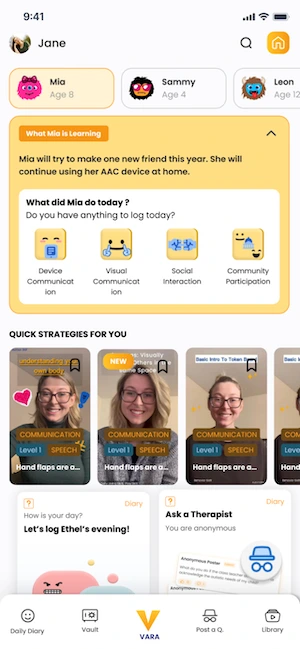
Understanding autism and supporting your child’s development doesn’t have to be overwhelming. With the Autism360 course videos, learning is simple, flexible and designed for real family life.
This tutorial is for parents and carers using the Autism360 app. It shows you how to find and watch course videos, use the notes and transcripts, and pick up where you left off.
How to Access Course Videos: Quick Steps
- Open the Courses section of the app (see the More screen if you can’t spot it).
- Tap any video that interests you. There’s no set place to start.
- Turn on full screen mode for the best view.
- When the video ends, choose a related video below it or tap Next Video.
- Come back any time. The app remembers where you left off.
Short, Engaging Videos Created by Experts
Each course in the Autism360 app is like a treasure chest, packed with short, easy-to-follow videos created by our team of autism specialists. From reinforcement strategies to communication tips and toilet training help, we cover a wide range of topics to support you.
Start Wherever You Like
There’s no right or wrong place to begin. Feel free to tap any video that sparks your interest. For the best viewing experience, we recommend watching in full screen mode.
Make It Your Own
As you watch, we encourage you to:
- Take notes on tips that stand out
- Read the transcripts to revisit key points
- Get to know the clinicians who built the course
The goal is to help you take in and use the information in the way that works best for you and your child.
Keep Learning, Seamlessly
Finished a video? Great! You’ll find related videos right below it, so you can keep exploring the topic without interruption. You can also tap the Next Video button to keep going.
Pick Up Where You Left Off
The next time you return to the Courses section, the app will remember where you left off, so you can dive straight back into your learning without missing a beat.
Start Learning with Autism360 Today
Whether you have five minutes or fifty, Autism360’s course videos are here to help you build confidence, gain clarity and support your child in ways that suit your family.
Tips for Busy Parents
- Use short gaps. One short video while your child naps or during a quiet ten minutes still adds up.
- Try one tip at a time. Pick one idea from a video to try this week before moving on to the next.
- Share it. Watching the same video as your partner or another carer helps everyone respond to your child in the same way.
Common Questions
Do I have to watch the videos in order?
No. There’s no right or wrong place to begin, so start with whatever matters most to your family right now.
Will the app remember where I stopped?
Yes. When you return to the Courses section, the app picks up where you left off.

Read More On:
🔐 How to Use the Vault Feature
Learn how to securely save and organize your bookmarks in the Autism360 Vault.
A simple guide to viewing and keeping track of your child’s progress with the Daily Diary feature.

Rachael Young is a behavior analyst with Autism 360, specializing in tailored, evidence-based support that improves daily life for children and their families. She is an Adjunct Instructor at Arizona State University, where she trains the next generation of behavior analysts, and is completing a PsyD in Clinical Psychology to deepen her clinical practice. Rachael is proud to identify as neurodivergent, and that lived perspective shapes the empathy and practicality of her work. She writes about ABA, autism in girls and women, co-occurring conditions and the teen years.

