Looking for a simple way to keep track of your child’s videos, saved resources and shared content? Welcome to Your Child’s Vault, a personalized space inside the Autism360 app that keeps all your bookmarks in the Vault, organized in one place.
This tutorial shows you where to find the Vault, what’s inside it, how each child’s Vault works and how to remove saved items. Watch the video above or follow the steps below.
Where to Find the Vault
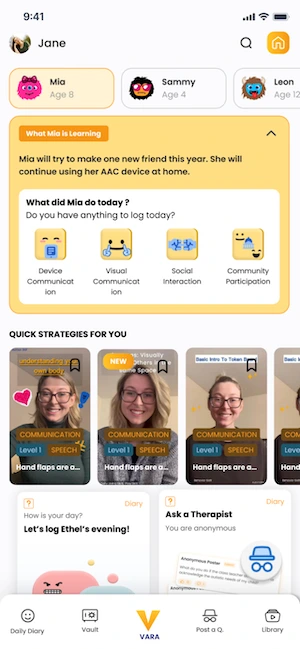
You can open the Vault directly from the Home screen or the More menu. It’s easy to find and even easier to use.
What You’ll See Inside
Inside the Vault, you’ll find:
- All of your child’s saved bookmarks
- Resources and videos shared by your therapist (if you’re part of the Autism360 program)
- A clean, organized layout so you can quickly find what you need
Everything is sorted and saved for each child, so there’s no mix-up between profiles.
Each Child Gets Their Own Vault
Every child profile in the app has its own personalized Vault. Even better, the Vault changes to match the color of their avatar, so it’s easy to tell them apart.
Just tap your child’s profile to open their Vault and explore their saved content.
Quick Steps: Opening Your Child’s Vault
- Go to the Home screen or the More menu.
- Open the Vault.
- Tap your child’s profile (look for the color that matches their avatar).
- Browse their saved bookmarks and any resources or videos your therapist has shared.
How to Remove Saved Items
Need to tidy up the Vault? No problem. Simply:
- Tap the bookmark icon on the content.
- Then unselect the orange bookmark on the child profiles you want to remove the item from.
Your Vault stays tidy and up to date with just a few taps.
Make the Most of the Vault
The Vault is your go-to spot for all your child’s learning materials and shared content. Whether you’re revisiting your therapist’s tips or rewatching a favorite video, the Vault makes it easier to stay organized and focused.
A tip: when you find a video or strategy that works well for your child, bookmark it straight away. Later, you can open the Vault on a busy day and find it in seconds, or share it with a partner, grandparent or carer so everyone uses the same approach.
- Have a quick tidy-up every few weeks and remove things you no longer use, so the strategies that matter now are easy to find.
- If you have more than one child, check which profiles a bookmark is saved to, so each Vault stays relevant to that child.
Frequently Asked Questions
Does each of my children have a separate Vault?
Yes. Every child profile has its own Vault, shown in the same color as their avatar, so saved content never gets mixed up between children.
Where do resources from my therapist show up?
If you’re part of the Autism360 program, resources and videos shared by your therapist appear in your child’s Vault.
Start exploring your child’s Vault today on the Autism360 app!

Read More On:
👤 How Do I Update My About Me Profile?
Learn how to edit and personalize your “About Me” section in the Autism360 app.
🎥 How to Access Course Videos
Step-by-step guide to find and watch your Autism360 course videos anytime.

Rachael Young is a behavior analyst with Autism 360, specializing in tailored, evidence-based support that improves daily life for children and their families. She is an Adjunct Instructor at Arizona State University, where she trains the next generation of behavior analysts, and is completing a PsyD in Clinical Psychology to deepen her clinical practice. Rachael is proud to identify as neurodivergent, and that lived perspective shapes the empathy and practicality of her work. She writes about ABA, autism in girls and women, co-occurring conditions and the teen years.